Landscape & Hardscape
Web Form Inquiries Flow Into the Field System in Seconds — Not Hours
The Challenge
A regional landscape and hardscape services firm had worked to build a strong online presence. Their website attracted consistent traffic from homeowners searching for lawn care, landscape design, and patio and retaining wall projects. The company used CallRail not only to track inbound calls but also to capture web form submissions — a smart setup that let them attribute form leads to specific marketing campaigns just like phone calls.
The problem was downstream. When a prospective customer filled out a request form on the website, CallRail captured the submission and its attribution data. But getting that lead into SingleOps, the field service management system the team used to schedule estimates and track jobs, required human action. Someone had to see the notification, open CallRail, copy the details, and manually enter a new lead record in SingleOps.
On a good day, that happened within a few hours. On a bad day, web form leads from evenings or weekends sat until Monday morning. The office team occasionally entered leads that had already called in separately — creating duplicates that confused schedulers and made the company look disorganized when they followed up.
The sales manager also had no real-time view of incoming web inquiries without logging into CallRail separately. Two systems, two logins, no sync.
The Solution
We built a workflow that captures every web form submission from CallRail the moment it comes in and automatically creates the appropriate lead record in SingleOps — with all submission details, source attribution, and contact information already populated.
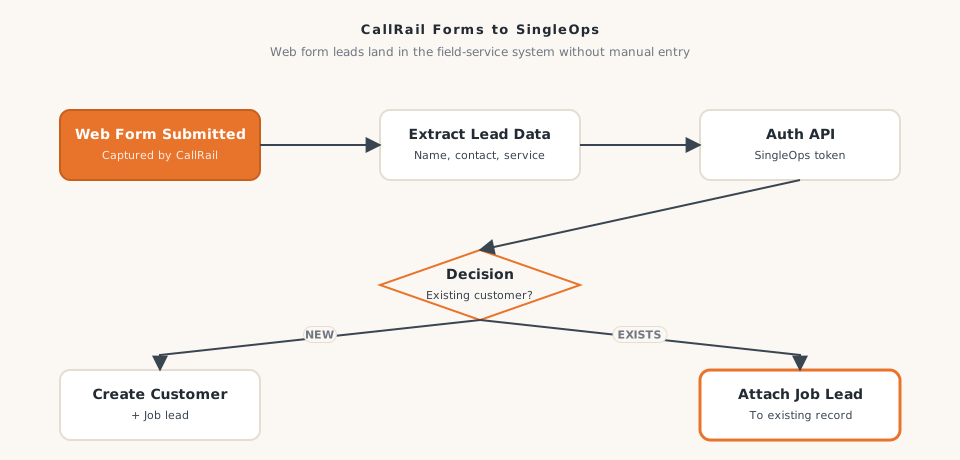
When a prospect submits any tracked form on the company’s website, CallRail logs the submission and the workflow fires. The system pulls the contact details, service interest, preferred contact method, and marketing source from the form data. It packages everything in the format SingleOps expects, then routes it based on whether the submitter is a new prospect or an existing customer in the system. New prospects get a fresh lead record. Existing customers get a new job inquiry attached to their existing profile.
The office team opens SingleOps in the morning to a fully populated list of overnight web leads, already entered, already sourced, ready to schedule. No inbox checking, no manual entry, no missed inquiries.
How It Works
- A prospect fills out a service request or contact form on the company's website
- CallRail logs the form submission and triggers the workflow immediately
- The workflow extracts all form fields: name, phone, email, service type, address, message, and marketing source
- The data is formatted for SingleOps entry
- The system checks whether the contact already exists as a customer or lead in SingleOps
- For new contacts: a new lead record is created in SingleOps with all form details and source data
- For existing customers: the new inquiry is logged against their existing record
- The lead is visible in SingleOps within seconds of the form being submitted, any time of day or night
The Results
- Web form leads now appear in SingleOps within 30 seconds of submission, compared to up to 18 hours under the manual process
- Office team reclaimed approximately 4 to 5 hours per week previously spent on manual form-to-lead entry
- Duplicate lead records from form and call cross-overs dropped by an estimated 85% after launch
- The company's estimate booking rate on web form leads improved 29%, because the scheduling team was reaching out while homeowners were still actively comparing options
- The sales manager gained a single-system view of all incoming leads — calls and forms — for the first time, improving weekly pipeline forecasting
This automation complemented the company's parallel phone lead automation, creating a unified intake process: whether a prospect called or filled out a form, the lead landed in SingleOps automatically and was ready for immediate follow-up.
Why It Matters for Your Business
If your web form leads are going into one system and your job management happens in another — with a human manually bridging the two — you are creating unnecessary delays and gaps on every inquiry. Impression Insights builds form-to-field-service integrations for landscaping, lawn care, and outdoor services companies. Let’s talk about building a lead intake process that works around the clock.
Ready to build yours?
Impression Insights builds practical automations for small to mid-sized businesses. Let's scope your first workflow.
Book a Discovery Call