Specialty Contractor
Every Contact Form Becomes a Sales Lead — No Copy-Pasting Required
The Challenge
A residential services contractor in the Midwest ran a steady volume of inbound quote requests through the contact form on their website. Homeowners would fill out the form asking about seasonal services, project estimates, or general inquiries. The problem was what happened after the form was submitted.
Those submissions landed in an email inbox. Someone on the office team — usually the office manager — had to read each one, decide if it was a genuine lead, and then manually type the contact information into Pipedrive, their CRM. Then they had to create a lead record, attach the project details, and make sure the right salesperson was assigned.
On a slow day, that process took 15 to 20 minutes per submission. On a busy day in spring or fall — when quote requests came in fastest — it might not happen until the next morning. The contractor had tracked internally that their close rate on jobs where they responded within two hours was nearly three times higher than on jobs where the first contact happened the next day. They knew speed mattered. They just couldn’t keep up.
There was also a growing duplicate problem: customers who had submitted a form before were getting entered as new contacts, leading to messy records and confusing handoffs between salespeople.
The Solution
We built a workflow that catches every contact form submission the moment it’s submitted and turns it into a properly formatted lead record in Pipedrive — automatically, with no human in the middle.
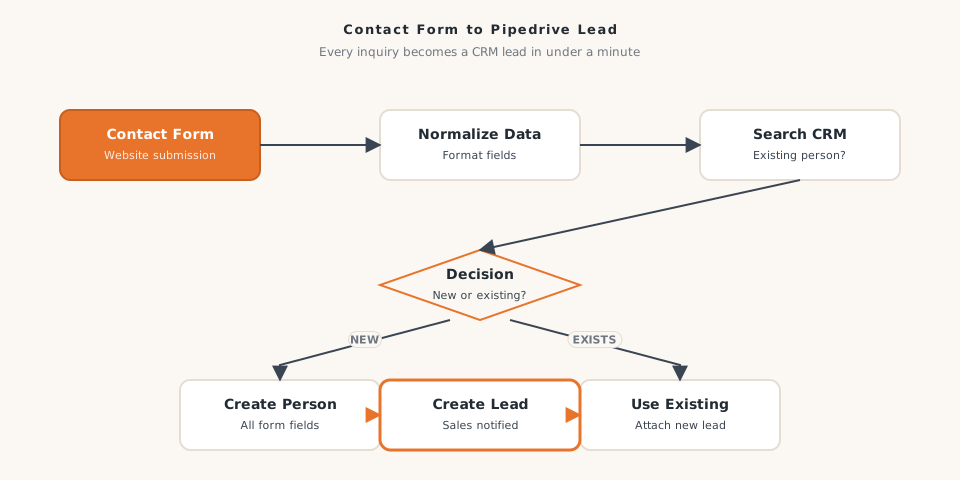
When the form fires, the workflow parses all the submitted fields, extracts the key project details, and runs a search against Pipedrive to check whether that person is already a contact. If they’re new, the system creates a person record and a lead record in the same motion, populating all the relevant fields and tagging the lead with the correct source channel. If they’re an existing contact, the system updates their record and creates a new lead tied to them — no duplicate person record, clean history, ready for the salesperson to review.
The whole sequence runs in under a minute of the form being submitted. Salespeople open Pipedrive and the lead is already there waiting.
How It Works
- A homeowner submits the contact form on the website
- The submission triggers the workflow immediately
- The system parses and normalizes the form data — name, phone, email, project type, address, notes
- Core project details are organized and stored as workflow variables
- Pipedrive is searched to determine if a contact with that email or phone already exists
- If the contact is new: a person record is created, a lead record is created, and the source channel is tagged
- If the contact exists: their person record is updated and a new lead is created under their existing profile
- The salesperson sees the lead in Pipedrive within 60 seconds of the form submission
The Results
- Lead response time dropped from an average of 14 hours to under 5 minutes
- Office manager reclaimed approximately 6 hours per week previously spent on manual data entry
- Duplicate contact records fell by an estimated 90% in the first quarter after launch
- The sales team's contact rate on inbound web leads increased 34%, because they were reaching out while the homeowner was still actively thinking about the project
- Estimated annual revenue impact from faster lead follow-up: $55,000 to $80,000 based on the contractor's average job size and historical close rate data
The contractor told us that before the automation, they had a good sales process — they just couldn't always start it fast enough. Now the starting gun fires the moment the form is submitted.
Why It Matters for Your Business
If your team is still manually entering contact form submissions into your CRM, you’re losing time on every lead and probably losing some leads entirely. Impression Insights builds form-to-CRM automations for residential contractors, service companies, and home improvement businesses across the Midwest. Let’s talk about how fast your leads could move.
Ready to build yours?
Impression Insights builds practical automations for small to mid-sized businesses. Let's scope your first workflow.
Book a Discovery Call