Field Service
The Automation That Keeps All Your Other Automations Running
The Challenge
A multi-location field service company had built a solid set of automations connecting ServiceFusion to other tools in their operation — customer lookups, job creation, dispatch notifications. The team relied on them. The problem was invisible: API access tokens.
When software systems communicate, they use short-lived access tokens — temporary credentials that expire on a regular cycle. When a token expires and no one has refreshed it, the automation that depends on it simply fails. Silently. No error message to a human. No alert. The workflow stops doing its job.
In practice, customer lookup workflows would occasionally return nothing — not because the customer didn’t exist, but because the connection had quietly broken. The team noticed only when they saw missing data or a customer called back asking why no one had followed up. Diagnosing the issue took time, and fixing it required someone with technical access to manually refresh the credentials. The operations manager estimated token failures were causing two to four hours of remediation work per month — entirely preventable.
The Solution
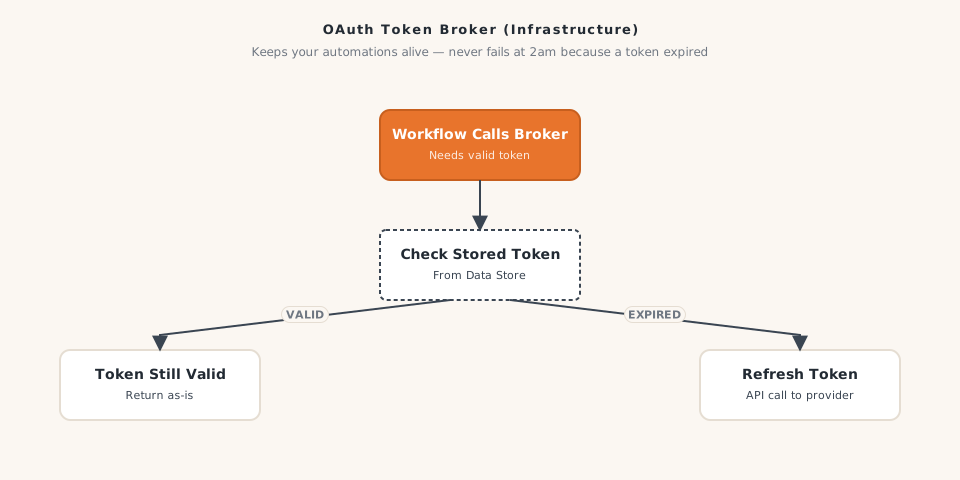
We built an OAuth broker: a dedicated background automation whose only job is managing the ServiceFusion API token lifecycle. When another workflow needs to contact ServiceFusion, it calls this broker first. The broker checks the stored token, determines whether it is still valid, and refreshes it proactively if needed — then returns a current, valid token to the requesting workflow.
The token is stored in a secure data store and updated automatically each time it refreshes. If a refresh attempt fails, the broker returns an explicit error state so the calling workflow pauses rather than proceeding with stale credentials.
Your automations never silently fail at 2am because a token expired. That is the promise this infrastructure keeps.
How It Works
- Any workflow needing to communicate with ServiceFusion calls the OAuth broker as its first step
- The broker retrieves the currently stored access token from the secure data store
- It checks whether the token is still valid or nearing its expiration window
- If the token is good, it is returned immediately to the calling workflow
- If the token is expired or expiring, the broker requests a fresh one from ServiceFusion
- The new token is saved to the data store and returned to the calling workflow
- If the refresh fails, the broker returns a clear error state — no bad token is passed downstream
The Results
- ServiceFusion-related automation failures dropped to zero following deployment, compared to two to four incidents per month before
- The operations manager recovered two to four hours per month previously spent diagnosing and manually fixing token issues
- Three separate automations — customer lookup, job creation, and dispatch notification — now draw on the same broker, meaning any future ServiceFusion workflow gets working authentication from day one
- The team stopped experiencing silent failures that only surfaced when a customer called to ask why no one had followed up
- Confidence in the overall automation stack increased — the team began using automations more actively because they trusted them to run
Why It Matters for Your Business
If you’re running multiple automations that connect to a field service platform, one expired token can quietly take down everything downstream — and you might not find out until a customer complains. Infrastructure automation like this keeps the whole stack healthy, automatically. Impression Insights builds this kind of foundational plumbing for multi-location field service companies. Let’s talk.
Ready to build yours?
Impression Insights builds practical automations for small to mid-sized businesses. Let's scope your first workflow.
Book a Discovery Call