Home Services
Call Recordings in the CRM, Automatically, Where the Team Can Actually Use Them
The Challenge
A multi-location home services company had used CallRail to track inbound marketing calls for over two years. Every call was recorded, tagged to a source, and stored in the CallRail platform. But that’s where the usefulness stopped.
The company’s CRM was Keap. When staff wanted to reference a customer call — to check what was said during a quote, review a complaint before a service visit, or use a recording for training — they had to leave Keap, log into CallRail separately, find the contact, and locate the right recording. For a multi-location operation where a customer might have called different tracking numbers across different campaigns, finding the correct recording could take five to ten minutes. Worse, most of the service team and some account managers didn’t have CallRail logins at all. Important context from customer calls was simply inaccessible to the people managing accounts day to day.
The marketing manager estimated the team spent two to three hours per week navigating between platforms to find recordings — more during onboarding periods when managers used calls for training.
The Solution
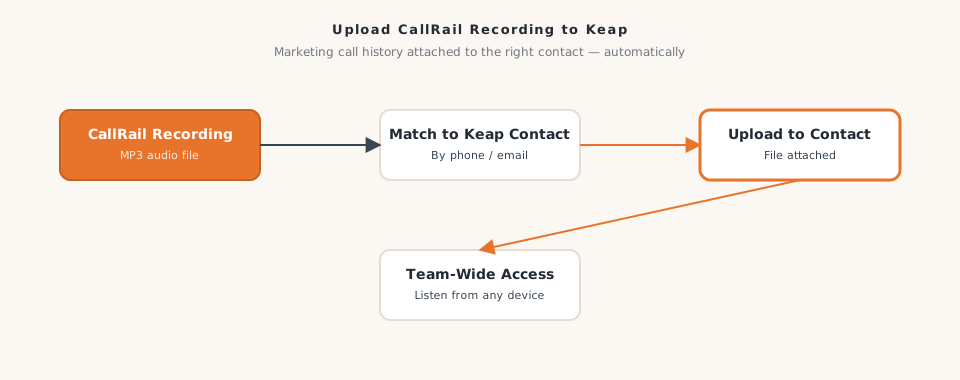
We built a workflow that runs after each qualifying call is recorded in CallRail. It fetches the recording file directly from CallRail, then uploads it to the matching contact record in Keap as an attached file, labeled and timestamped so it’s clear which call it belongs to.
The workflow is built as a reusable module, so other automations in the company’s stack can invoke it as a step — keeping the upload logic maintained in a single place rather than duplicated across workflows. Once uploaded, the recording lives in Keap alongside the contact’s notes, tags, and service history. Any team member with Keap access can play it back without a separate login or platform switch.
How It Works
- A call completes and is recorded in CallRail
- The parent workflow passes the call details to this recording upload module
- The module requests the audio file from CallRail for that specific call
- The recording file is sent to Keap's file upload endpoint
- The file is attached to the correct contact record in Keap, labeled with the call date and source
- The module returns a confirmation that the upload completed successfully
The Results
- Call recordings are now available inside Keap contact records within minutes of call completion, with no manual steps required
- The marketing manager and account team reclaimed approximately 2 hours per week previously spent navigating between CallRail and Keap
- All Keap users — including service staff without CallRail access — can now review call recordings directly from a contact's record
- Sales training became significantly more practical, as managers can pull recordings and share them within Keap rather than scheduling separate CallRail review sessions
- The company identified three service quality issues within the first 60 days by reviewing calls surfaced in the CRM workflow, something that would not have happened with recordings behind a separate login
Call recordings are only useful if the people who need them can get to them quickly and in context. Uploading them automatically into the CRM makes two years of customer interaction history accessible to the whole team.
Why It Matters for Your Business
If your call recordings live in one platform and your CRM in another, most of your team isn’t using those recordings — not because they don’t want to, but because the friction is too high. Bringing recordings into Keap automatically means every customer interaction is in one place. Impression Insights builds automations like this for multi-location home services companies. Let’s talk.
Ready to build yours?
Impression Insights builds practical automations for small to mid-sized businesses. Let's scope your first workflow.
Book a Discovery Call