Home Services
The Right Salesperson Gets Notified at the Exact Right Moment — Every Time
The Challenge
A specialty home-services company had built its sales process around Keap, the CRM and marketing automation platform also known as Infusionsoft. Their marketing team used Keap’s tagging system to segment contacts: a tag applied to a contact record signaled where that person was in the buying journey or what action the sales team should take next. It was a clean system in theory — a marketing automation would apply a tag, and a salesperson would see it and act.
In practice, the “see it and act” part was the problem.
When a marketing automation applied a tag, nothing automatically told the assigned salesperson to do anything. The salesperson had to regularly check their Keap contact list, filter by tag, and manually identify who needed follow-up. If they were out in the field — which, for a home-services company, was most of the time — that check might not happen until the end of the day, or the next morning. Some tags went unworked for several days.
The sales manager had also noticed a related problem: notes and existing open tasks already lived on many contact records, but salespeople had no easy way to surface that context before picking up the phone. They were going in cold when the information they needed was already in Keap.
The Solution
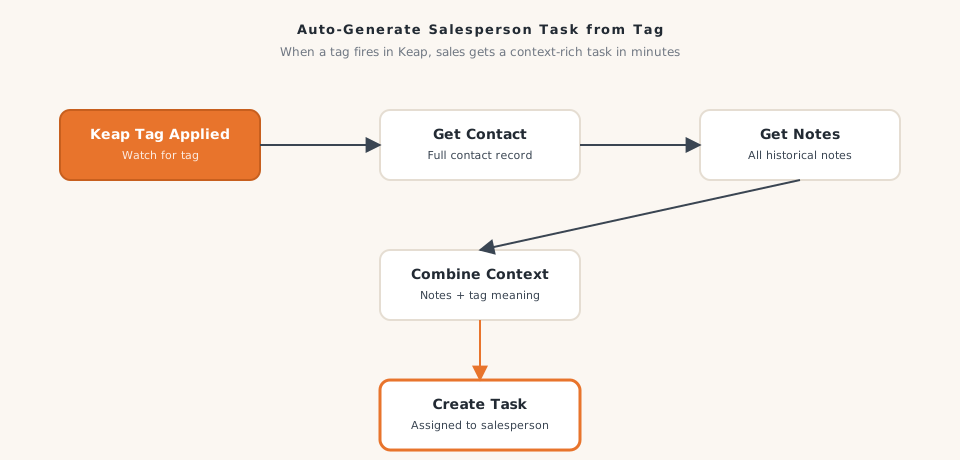
We built a workflow that watches for specific tags being applied in Keap and immediately takes action: it retrieves the full contact record, gathers any existing notes and open tasks, and then creates a properly formatted task for the assigned salesperson — with all the relevant context included.
When a tag is applied to a contact in Keap, the workflow fires. It pulls the complete contact record so it has the person’s full history and details. It then checks whether any notes already exist on the contact, aggregating them into a summary the salesperson can review before reaching out. It also checks whether any open tasks already exist for this contact, so the system can avoid creating a duplicate task when one is already in flight.
With all of that information in hand, the workflow creates a new task in Keap assigned to the right salesperson, populated with the contact details, relevant notes, and any instructions tied to that particular tag. The salesperson gets a task notification and has everything they need to make a confident, informed outreach — no digging required.
How It Works
- A marketing automation (or a team member) applies a designated tag to a contact record in Keap
- The workflow detects the tag application immediately
- The full contact record is retrieved, including all stored details and history
- Existing notes on the contact are collected and compiled into a summary
- Existing open tasks for that contact are checked to prevent redundant task creation
- The system evaluates the tag to determine what type of task should be created and who should own it
- A new task is created in Keap, assigned to the correct salesperson, with all relevant contact context attached
- The salesperson receives a task notification with everything they need to follow up
The Results
- Average time from tag application to salesperson notification dropped from more than 24 hours to under 2 minutes
- Zero missed follow-ups due to unnoticed tag applications in the months since launch
- Salespeople reported needing 40% fewer minutes per call to prepare, because context was already in the task
- Duplicate task creation dropped to near zero, eliminating the confusion of salespeople finding multiple tasks for the same contact
- Sales manager estimated that tighter tag-to-task speed contributed to a 15% improvement in contact rate on warm leads over the following quarter
The company's CRM had always been capable of this level of coordination. They just needed the connections built so the system could actually deliver on its potential.
Why It Matters for Your Business
If your team uses tags, stages, or statuses in a CRM to signal when someone needs follow-up, but those signals depend on a person noticing them, you have a gap in your sales process. Impression Insights builds sales workflow automations for home-services companies, field-service businesses, and specialty contractors running Keap, Pipedrive, and other platforms. Let’s talk about closing that gap.
Ready to build yours?
Impression Insights builds practical automations for small to mid-sized businesses. Let's scope your first workflow.
Book a Discovery Call